
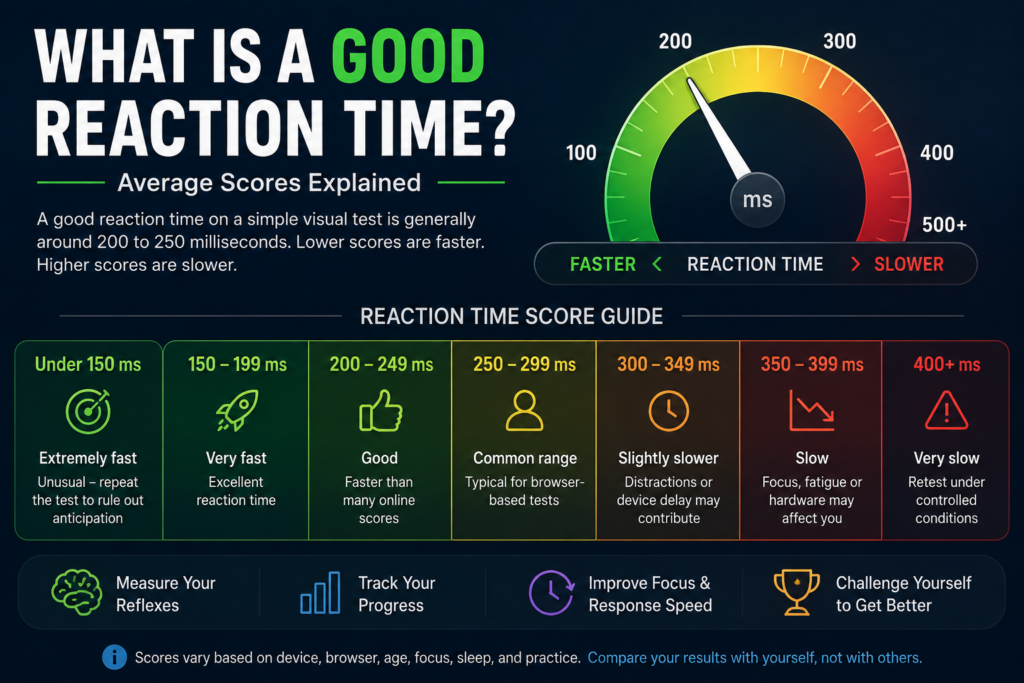
A good reaction time on a simple visual test is generally around 200 to 250 milliseconds. Results below 200 ms are usually very fast, while scores between 250 and 300 ms are also common on browser-based reaction tests.
There is no single perfect score for everyone. Age, attention, sleep, practice, monitor refresh rate, mouse or touchscreen latency, browser performance, and the type of test can all influence the result you see.
Reaction Time Score Guide
The following ranges provide a practical way to interpret a simple visual reaction test.
| Reaction Time | General Interpretation |
|---|---|
| Under 150 ms | Extremely fast; repeat to rule out anticipation |
| 150–199 ms | Very fast |
| 200–249 ms | Good |
| 250–299 ms | Common browser-test range |
| 300–349 ms | Slightly slower |
| 350–399 ms | Slow result; retest under better conditions |
| 400 ms+ | Check distractions, device, and testing conditions |
These ranges are general guidance rather than medical or clinical standards. Different devices and test designs can produce different results.
For the fairest comparison, use the same device and complete several attempts instead of judging yourself by one unusually fast or slow click.
What Is Reaction Time?
Reaction time is the delay between a stimulus appearing and the beginning of your response.
In a basic visual test, the process normally looks like this:
- Wait for the visual signal
- Detect the change
- Recognize the signal
- Start the hand movement
- Click, tap, or press a key
- Receive the result in milliseconds
One millisecond is one-thousandth of a second. A result of 250 ms therefore represents one-quarter of a second.
The Reaction Time Test on this website measures a simple visual response. You already know which signal will appear and what action you need to perform.
What Is the Average Human Reaction Time?
There is no single universal human reaction-time average because test design, equipment, age, stimulus type, and response method can all change the result.
For simple visual tests, results around 200–250 ms are often considered fast to good. Online browser tests can produce somewhat higher results because display, browser, operating-system, and input-device delays are included.
This is why two websites may give you different scores even when your own response has not changed significantly.
For a deeper breakdown by age group, read Average Human Reaction Time by Age.
Is 200 ms a Good Reaction Time?
Yes. A consistent result around 200 ms is fast for a simple visual browser test.
However, one 200 ms attempt does not necessarily represent your normal performance. A session might look like this:
| Attempt | Result |
|---|---|
| 1 | 241 ms |
| 2 | 203 ms |
| 3 | 226 ms |
| 4 | 215 ms |
| 5 | 229 ms |
The best result is 203 ms, while the average is about 223 ms. The average gives a more balanced picture of the complete session.
Is 250 ms a Good Reaction Time?
Yes. A 250 ms score is a normal-to-good result for a simple visual browser test.
A consistent average near this level is more useful than one isolated personal-best click. Pay attention to how closely your attempts are grouped and whether your average improves over time.
Is 300 ms a Bad Reaction Time?
No. A result around 300 ms is not automatically bad.
Your score may be affected by:
- Tiredness
- Distraction
- Touchscreen use
- An unfamiliar device
- Low display refresh rate
- Background applications
- Browser performance
- Being cautious to avoid false starts
Retest under similar conditions before deciding whether the score represents your normal performance.
What About Reaction Times Below 150 ms?
A score below 150 ms can appear, but extremely low results should be interpreted carefully.
Possible reasons include:
- Anticipating the signal
- Clicking at the right moment by chance
- Technical timing variation
- An early response not being rejected
- A genuinely exceptional attempt
A very fast score becomes more convincing when you can repeat it across several valid attempts.
Average, Median, or Best: Which Matters Most?
A complete reaction-time session can show several statistics, and each tells you something different.
Average: Uses every valid result and provides a useful summary of the full session.
Median: Shows the middle result and is less affected by one unusually slow or fast attempt.
Best: Shows your fastest valid response but does not necessarily represent your typical performance.
Consistency: Shows how closely your attempts are grouped.
For progress tracking, focus mainly on your average, median, and consistency. Treat the best score as an additional performance highlight.
Why Does My Reaction Time Change?
Reaction time naturally varies between attempts and sessions.
Common factors include:
- Focus and attention
- Sleep and fatigue
- Practice and familiarity
- Stress or anticipation
- Monitor refresh rate
- Mouse or touchscreen latency
- Browser performance
- Background applications
- Hand position
Your score is most meaningful when the same setup is used repeatedly.
For more detail about technical delay, read How Accurate Is an Online Reaction Time Test?.
Desktop vs Mobile Reaction Time
A result recorded on a smartphone may differ from a desktop result because the input method and hardware are different.
Desktop testing may involve a physical mouse, fixed hand position, and a high-refresh-rate monitor. Mobile testing uses touchscreen processing, finger movement, different screen hardware, and mobile browser behavior.
Neither result is automatically wrong. They simply come from different testing conditions.
For progress tracking, avoid mixing desktop and mobile sessions.
How Many Attempts Should You Complete?
Complete at least five valid attempts for a useful session.
One attempt can be influenced by surprise, distraction, hesitation, anticipation, or temporary technical delay.
A simple testing routine is:
- Complete one practice attempt.
- Complete five valid recorded attempts.
- Review the average and median.
- Note any false starts.
- Retest later using the same setup.
Completing many attempts without a break is not always better because fatigue and practice effects can change your results.
How to Get a More Reliable Score
Use these basic rules when testing:
- Use the same device
- Use the same browser
- Close unnecessary applications
- Pause large downloads
- Remove distractions
- Keep your hand in a comfortable position
- Complete a practice attempt
- Wait for the signal instead of predicting it
- Complete five valid attempts
- Compare averages rather than single clicks
Consistency in your testing conditions is more valuable than constantly changing devices or chasing a personal-best score.
Can You Improve Your Reaction Time?
Your reaction-test performance may improve with practice, better attention, and familiarity with the task.
Early improvement can happen because you:
- Understand the test better
- Focus on the correct area
- Reduce hesitation
- Use a more comfortable hand position
- Become more consistent
- Avoid unnecessary movement
For structured training ideas, read How to Improve Your Reaction Time Test Score.
Gamers can also use Reaction Time Test for Gamers: Improve Speed for FPS Games for game-specific practice.
Frequently Asked Questions
What is considered a good reaction time?
Around 200–250 ms is generally a good result for a simple visual browser test. Results between 250 and 300 ms are also common.
Is 200 ms reaction time fast?
Yes. A consistent average around 200 ms is a fast result for a simple visual response test.
Is 250 ms reaction time good?
Yes. 250 ms falls within a normal-to-good range for many browser-based visual tests.
Is 300 ms reaction time slow?
It is somewhat slower than common simple visual results, but device delay, tiredness, attention, and testing conditions can all contribute.
Should I use my best score or average?
Use your average and median to understand typical performance. Your best score only represents your fastest valid attempt.
Why is my reaction time slower on mobile?
Touchscreen processing, finger movement, screen refresh rate, and mobile browser behavior can make mobile scores different from desktop scores.
Does age affect reaction time?
Reaction time can change across adulthood, but age is only one factor. Sleep, health, attention, practice, and device conditions also matter.
Is an online reaction test medically accurate?
No. A browser Reaction Time Test is intended for general performance measurement and personal comparison, not medical diagnosis or professional assessment.
Test Your Reaction Time
The easiest way to understand your current level is to complete several attempts under consistent conditions.
Use the free Reaction Time Test to review your average, median, best result, slowest result, consistency, and attempt history.
Is 200–300 ms a Good Reaction Time?
For most browser-based visual reaction-time tests, a score between 200 and 300 milliseconds is generally a normal result for many adults.
A result around 224 ms is relatively quick for a simple visual reaction test, while 257 ms is also within a common range. Small differences such as 20–30 ms should not be overinterpreted because your device, display refresh rate, browser, input method, fatigue, and testing conditions can affect the result.
For a more useful comparison, complete several attempts and compare your average and median reaction time rather than relying on a single click.
Disclosure: Some of the links in this article are affiliate links. If you buy through them, we may earn a small commission at no extra cost to you — and as an Amazon Associate, we earn from qualifying purchases.
Test yourself on proper gear: a gaming mouse and a high-refresh-rate monitor take hardware delay out of your score — check the current price on Amazon.
Conclusion
A good reaction time on a simple visual browser test is generally around 200 to 250 milliseconds, while results between 250 and 300 milliseconds are also common. Always interpret the number alongside your device, attention, sleep, practice, and testing conditions.
Instead of judging yourself by one click, complete at least five valid attempts and focus on your average, median, and consistency. Use the same setup when retesting so that changes in your score are easier to interpret.