
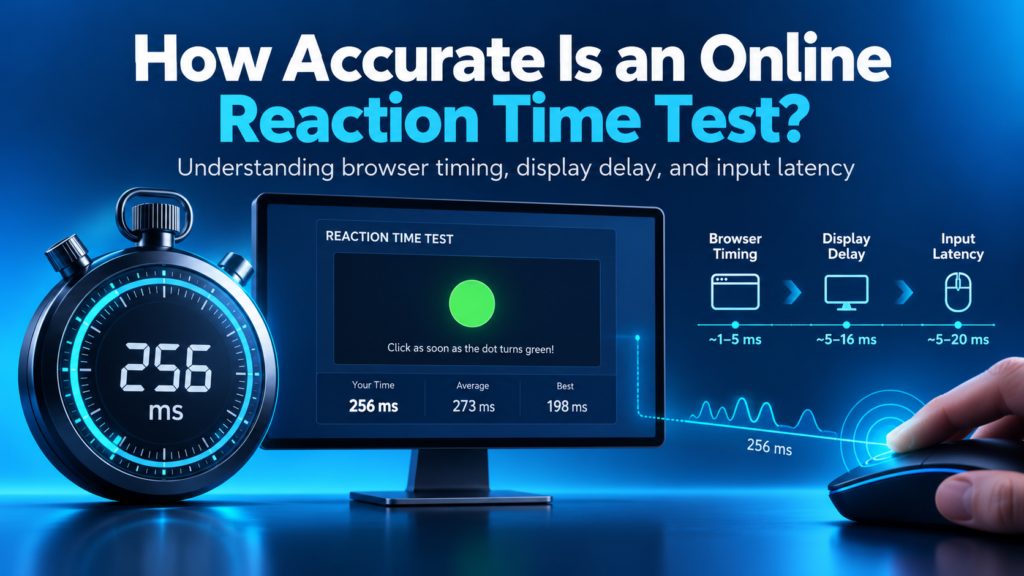
An online Reaction Time Test can measure how quickly you respond to a visual signal, but the number shown on the screen isn’t a perfectly isolated measure of your nervous system.
The displayed result normally includes several components:
Visual response + display delay + input-device delay + browser and operating-system processing = displayed reaction time
Modern browsers provide high-resolution timing tools that can measure short intervals using a monotonic clock. These timers are useful for performance measurement because normal system-clock adjustments do not affect the elapsed-time measurement.
However, browser timing cannot remove every delay outside the timer. The visual signal still has to reach the display, appear during a screen refresh, be detected by the user, and then travel back through a mouse, keyboard, or touchscreen before the browser records the response.
This makes an online Reaction Time Test useful for personal testing and progress tracking, especially when the same setup is used each time. It does not make the result equivalent to a calibrated laboratory measurement or a direct measurement of biological reaction time.
Quick answer: An online Reaction Time Test is generally useful for measuring repeated performance trends on the same device and browser. Its absolute score remains approximate because the monitor, mouse, touchscreen, browser, operating system, and physical response method can add delay.
What Does “Accurate” Actually Mean?
Before deciding whether an online reaction test is accurate, it helps to separate three different ideas.
Measurement Accuracy
Accuracy describes how close the displayed result is to the actual interval between the signal becoming physically visible and the user beginning the recorded response.
A test can lose absolute accuracy when the software starts timing before the monitor has physically displayed the signal or stops timing after the input device has already begun processing the response.
Measurement Precision
Precision describes how consistently the test measures repeated events.
For example, a particular setup may add a similar technical delay to every attempt. The absolute results may be slightly higher than the user’s biological response, but the measurements may still be consistent enough to compare one session with another.
Test Validity
Validity describes whether the test measures the skill it claims to measure.
A simple browser reaction test normally measures a basic visual response:
- Wait for a visual change.
- Detect the change.
- Click, tap, or press a key.
It does not fully measure decision-making, movement speed, driving ability, gaming skill, sports performance, neurological health, intelligence, or professional fitness.
A test can therefore be technically consistent while still having limited validity for a completely different real-world task.
How an Online Reaction Time Test Measures Your Response
A typical browser reaction test follows several stages.
Step 1: The Test Selects a Random Delay
After the user starts an attempt, the test waits for an unpredictable period. This reduces the chance of clicking according to a fixed rhythm instead of genuinely reacting to the signal.
Step 2: The Browser Triggers the Visual Signal
The webpage changes the testing area, often from one color to another.
At this stage, the software knows that the signal should be displayed. The user may not see it at the same instant because the display still needs to present the updated frame.
Step 3: The Monitor Displays the Change
A monitor updates its image at fixed refresh intervals. The requested color change may therefore wait until the display’s next available frame.
The displayed signal can also be affected by:
- Refresh rate
- Internal display processing
- Pixel response
- Display mode
- Connection and graphics pipeline
- Television image processing when a TV is used
Step 4: The User Detects the Signal
The eyes detect the visual change, and the brain begins the required response.
This is the human portion of the measurement.
Step 5: The User Clicks, Taps, or Presses
The physical response must be converted into an electronic input event.
Different response methods can require different physical movements. A finger already resting on a mouse button does not perform exactly the same movement as a finger moving toward a touchscreen.
For that reason, mouse, keyboard, trackpad, and touchscreen results should not automatically be treated as identical measurements.
Step 6: The Input Reaches the Browser
The response device sends the action through its hardware, firmware, operating-system input stack, and browser event system.
Only then can the test stop the timer and calculate the displayed result.
Are Browser Timers Precise Enough?
Modern web browsers support the Performance API, including performance.now().
It uses a monotonic timing source and is designed for measuring elapsed time with much greater precision than ordinary date-and-time functions.
The browser’s internal stopwatch is therefore not usually the largest accuracy problem in a basic reaction test.
The bigger challenge is that the timer cannot automatically know the exact physical moment when:
- A pixel becomes visible to your eyes
- A mouse switch physically activates
- A touchscreen recognizes contact
- A keyboard sends its report
- The operating system delivers the event
Timer precision does not guarantee complete end-to-end measurement accuracy.
A browser may calculate an interval very precisely while that interval still contains several hardware and software delays.
What Research Says About Online Reaction-Time Accuracy
Research on browser-based reaction-time measurement supports a balanced conclusion.
Modern online experiment platforms can record response times with useful precision, but timing performance can vary across browsers, operating systems, devices, software implementations, and hardware configurations.
Research comparing browser-based and laboratory timing has found that web-based reaction-time measurement can preserve useful patterns while absolute response times may differ between technical setups.
Studies of online experiment platforms have also shown that no single browser, operating system, or device combination performs identically in every situation.
Input hardware introduces another layer of variation. Different response devices can introduce different amounts of delay, so one universal correction value should not be subtracted from every online reaction score.
The practical conclusion is:
- Online tests can provide useful data.
- Modern browser timing can be reasonably precise.
- Absolute scores can include systematic technical delay.
- Different setups should not be compared as though they were identical.
- Repeated testing under consistent conditions is usually more informative than one isolated result.
How Accurate Is the Reaction Time Test on This Website?
The Reaction Time Test on this website records five valid attempts and displays the average, median, best, slowest, and consistency results.
It also provides an attempt graph and can store completed sessions locally in the current browser.
This makes the test more useful for examining a pattern instead of relying on a single click.
The result should still be interpreted as an approximate browser measurement because the displayed number can include delay from:
- The monitor
- Mouse or keyboard
- Touchscreen
- Browser
- Operating system
- Background system activity
- Physical response method
The website advises users to compare results on the same device, browser, and input method whenever possible.
It is most useful for:
- Establishing a personal baseline
- Comparing repeated attempts
- Monitoring consistency
- Tracking changes on the same setup
- Practicing a simple visual response
- Identifying unusually fast, slow, or inconsistent sessions
It should not be used as:
- A medical diagnosis
- A neurological assessment
- A driving-fitness decision
- An employment test
- A scientific laboratory instrument
- Proof of gaming or athletic ability
Accuracy vs. Repeatability: Which Matters More?
For most users, repeatability is more practical than perfect absolute calibration.
Suppose a particular computer setup adds a relatively stable amount of technical delay.
Your sessions might look like this:
Week 1 — 248 ms
Week 2 — 245 ms
Week 3 — 238 ms
Week 4 — 234 ms
The displayed values may not equal a laboratory-calibrated biological response. However, because the same setup was used each time, the downward trend may still provide useful information about your performance on that setup.
Now imagine that each result was recorded differently:
Week 1 — Desktop with wired mouse
Week 2 — Smartphone touchscreen
Week 3 — Laptop trackpad
Week 4 — Television with wireless mouse
In that case, part of the difference may be caused by the equipment rather than the user.
This is why a fair personal comparison should use:
- The same device
- The same display
- The same input method
- The same browser
- Similar testing conditions
- Multiple attempts per session
The Main Factors That Affect Online Reaction Test Accuracy
1. Monitor Refresh Rate
A display operating at 60 Hz updates approximately 60 times per second, while a 120 Hz or 144 Hz display updates more frequently.
Disclosure: Some of the links in this article are affiliate links. If you buy through them, we may earn a small commission at no extra cost to you — and as an Amazon Associate, we earn from qualifying purchases.
On a 60 Hz screen you are measuring your monitor as much as yourself — high-refresh gaming monitors remove that ceiling.
A faster refresh cycle can reduce the amount of time a visual change waits for the next available frame.
For a detailed comparison of 60Hz, 144Hz, and 240Hz displays, see our guide on how refresh rate affects reaction time.
However, refresh rate is only one part of the complete display pipeline.
Do not assume that every 144 Hz display has lower total latency than every 60 Hz display. Internal processing and configuration also matter.
2. Display Processing
Some monitors and televisions process the image before displaying it.
Possible processing includes:
- Image enhancement
- Motion smoothing
- Scaling
- Noise reduction
- Dynamic contrast
- Frame interpolation
A low-latency or game mode may reduce some processing, but the actual effect depends on the specific display.
3. Mouse Delay
Different mice can vary in switch behavior, polling rate, firmware, wireless connection, and internal processing.
Disclosure: Some of the links in this article are affiliate links. If you buy through them, we may earn a small commission at no extra cost to you — and as an Amazon Associate, we earn from qualifying purchases.
A slow mouse adds delay before your click even registers — low-latency gaming mice are built to keep that delay as small as possible.
Wireless use is not automatically inaccurate, and a wired mouse is not automatically perfect. The specific hardware and configuration matter.
4. Keyboard Delay
A keyboard has its own scanning process, firmware, connection, and operating-system event path.
A keyboard press and mouse click should not be assumed to produce identical results.
Use one input method consistently when tracking progress.
5. Touchscreen Processing
A touchscreen must detect contact, determine its location, process the touch event, and deliver it to the application.
The physical gesture also matters.
Tapping an empty screen, lifting a resting finger, and moving a finger toward a target can involve different movement times.
For this reason, mobile and desktop results should normally be tracked separately.
6. Browser and Operating System
Different combinations of browsers and operating systems can vary in:
- Visual timing
- Event handling
- Scheduling
- Background processing
- Power management
- Input handling
Use a modern, stable browser and avoid changing browsers between comparison sessions whenever possible.
7. Background Activity
Heavy applications can compete for system resources.
Possible causes of inconsistent results include:
- Game updates
- File downloads
- Video rendering
- Many active browser tabs
- Antivirus scans
- Operating-system updates
- Cloud synchronization
- Streaming
- Screen recording
Modern computers handle multitasking well, but a heavily loaded or unstable system can still introduce timing variation.
8. Browser Tab Visibility
Browsers may reduce activity in inactive or background tabs.
Keep the Reaction Time Test visible and active.
Do not switch windows or tabs while waiting for the signal.
9. Physical Input Technique
The position of your hand can affect the movement required to respond.
Examples include:
- Finger already resting on a mouse button
- Finger hovering above a touchscreen
- Hand moving toward the device
- Trackpad tap
- Keyboard key press
- Mouse click requiring additional hand movement
A controlled test should use the same response technique for every attempt.
10. Anticipation and False Starts
A result can appear exceptionally fast when the user predicts the signal instead of reacting after seeing it.
The test uses a random waiting period and marks early responses as false starts.
A “Too Soon” result should not be included as a valid reaction measurement.
Does Internet Speed Affect the Result?
Internet speed is usually not the main source of delay after a correctly designed client-side reaction test has fully loaded.
The timer and input handling can run locally inside the browser instead of sending every click to a remote server before calculating the score.
However, a poor connection can still indirectly affect the experience when:
- The page has not finished loading
- Scripts or fonts are delayed
- Advertising or third-party content continues loading
- The page reloads during testing
- The test depends on server communication
- Network activity creates heavy system load
For a cleaner session:
- Allow the page to load completely.
- Close unnecessary network-heavy tabs.
- Pause large downloads.
- Keep the test tab active.
- Start only after the interface responds normally.
Do not use internet ping as a correction value for a browser reaction score.
Online-game network latency and local browser input timing are different measurements.
Is Desktop More Accurate Than Mobile?
Desktop results are not universally more accurate, but desktop setups can often be easier to standardize.
A desktop test may use:
- A fixed monitor
- A consistent mouse
- Stable hand placement
- A full-size testing area
- Fewer orientation changes
A mobile test may vary according to:
- Touchscreen hardware
- Browser behavior
- Finger position
- Device orientation
- Touch gesture
- Screen refresh rate
- Power-saving mode
For personal tracking, compare desktop and mobile as separate testing categories.
Do not interpret a slower mobile result as automatic evidence that your natural reaction has become worse.
How Many Attempts Produce a Reliable Result?
One attempt is not enough to represent typical performance.
A single score can be influenced by:
- Distraction
- Anticipation
- An accidental click
- Unusual focus
- Hand movement
- Temporary system delay
- Random variation
Complete at least five valid attempts and review:
- Average
- Median
- Best
- Slowest
- Consistency
- False starts
The website’s test uses five valid attempts for its complete session summary.
For personal tracking, compare several five-attempt sessions recorded on different days under similar conditions.
Why the Median Is Useful
The median is the middle value after the attempts are ordered from fastest to slowest.
Example:
214, 220, 226, 232, 481 ms
The average is pulled upward by the unusually slow final attempt, while the median remains closer to the main group of scores.
Use several statistics together:
- Average: Includes every valid attempt
- Median: Less affected by one extreme result
- Best: Shows the fastest valid response
- Consistency: Shows how widely attempts vary
How to Make an Online Reaction Time Test More Reliable
Use the Same Setup
Keep the following unchanged whenever possible:
- Computer or phone
- Monitor
- Browser
- Mouse, keyboard, or touchscreen
- Input method
- Screen mode
Let the Page Finish Loading
Wait until the interface is fully visible and responsive before beginning.
Close Heavy Applications
Pause downloads, updates, recording software, and unnecessary programs.
Keep the Test Tab Active
Do not switch tabs or applications during an attempt.
Use a Stable Hand Position
Rest your hand comfortably and keep the responding finger ready.
Complete One Practice Attempt
A warm-up helps you understand the test without using the first unfamiliar response as part of your personal baseline.
Complete All Five Valid Attempts
Review the complete session instead of stopping after one unusually fast result.
Do Not Predict the Signal
Respond only after the testing area visibly changes.
Record the Device Used
Keep track of whether the test was completed with:
- Desktop mouse
- Laptop trackpad
- Keyboard
- Smartphone touchscreen
- Tablet touchscreen
Test at Similar Times
Attention and energy can change during the day.
Testing at reasonably similar times can make repeated comparisons easier to interpret.
How to Interpret Your Results Correctly
Treat the Score as an End-to-End Measurement
The displayed number represents the full path from browser signal to recorded input.
It is not a direct reading from the brain.
Compare Like With Like
Compare mouse sessions with mouse sessions and touchscreen sessions with touchscreen sessions.
Look for Repeated Patterns
A change that appears across several sessions is more meaningful than one isolated result.
Keep Technical Changes in Mind
A new monitor, mouse, browser, operating system, or device may shift your baseline.
When your setup changes significantly, create a new baseline rather than comparing the new score directly with the old one.
Related Reaction Time Guides
For detailed score interpretation, read:
What Is a Good Reaction Time? Average Scores Explained
https://reactiontimetest.us.com/what-is-a-good-reaction-time/
For training methods, read:
How to Improve Your Reaction Time Test Score
https://reactiontimetest.us.com/improve-reaction-time-test-score/
For gaming-specific practice, read:
Reaction Time Test for Gamers: Improve Speed for FPS Games
https://reactiontimetest.us.com/reaction-time-test-for-gamers-improve-speed-for-fps-games/
Online Test vs Laboratory Test
An online reaction test is easy to access and useful for repeated personal testing, but a calibrated laboratory setup provides much greater control over hardware, displays, response devices, lighting, and timing.
A laboratory setup may use calibrated displays, photodiodes, specialized response boxes, controlled lighting, and hardware tools that measure the physical stimulus and response.
A normal website usually does not have access to that level of calibration.
This does not make online tests useless.
It means their results should be interpreted according to their actual measurement conditions.
Frequently Asked Questions
Are online Reaction Time Tests accurate?
They are generally useful for approximate personal measurement and repeated comparisons. Absolute results can include delay from the display, input device, browser, operating system, and physical response method.
Is the millisecond number exact?
The browser can measure elapsed intervals precisely, but the displayed number is not necessarily an exact biological reaction time because external hardware and software delays are included.
Can I compare my score with another person?
You can compare for casual interest, but the comparison is fairer when both users have similar devices, displays, input methods, browsers, and testing conditions.
Why is my score different on another website?
Different sites may use different signal timing, visual design, event types, scoring rules, invalid-attempt handling, and software implementations.
Use one test consistently when tracking personal progress.
Why is my result slower on mobile?
Touch processing, finger movement, browser behavior, refresh rate, and device hardware may differ from a desktop mouse setup.
Does a wireless mouse make the result inaccurate?
Not automatically.
Wired and wireless devices both vary by model and configuration.
Does monitor refresh rate affect accuracy?
Refresh rate can influence when a newly requested visual frame becomes visible.
It is one part of total display delay, not the only factor.
Should I subtract device latency from my score?
Do not subtract a guessed value.
Device delays vary, and a reliable correction would require actual end-to-end hardware measurement.
Does internet ping affect a browser Reaction Time Test?
A client-side test generally does not use internet ping as part of each reaction measurement after loading.
Is the best score the most accurate result?
Not necessarily.
The best score may be genuine, unusually well-timed, or influenced by anticipation.
Why did I get an extremely low score?
You may have reacted very quickly, but very low results can also occur when the signal is anticipated.
Repeat the session and check for false starts.
How many attempts should I complete?
Complete at least five valid attempts.
Multiple sessions under similar conditions provide a more useful personal pattern.
Can an online test diagnose a medical condition?
No.
A general browser Reaction Time Test is not a medical or neurological diagnostic tool.
Can I use the result for driving or employment decisions?
No.
Casual browser results should not be used for driving, employment, medical, legal, or professional decisions.
References and Further Reading
The technical discussion in this guide is based on established browser-timing specifications and published research on online reaction-time measurement.
- W3C High Resolution Time Specification — documentation covering high-resolution monotonic timing and performance.now().
- Anwyl-Irvine, Dalmaijer, Hodges & Evershed (2021) — Realistic precision and accuracy of online experiment platforms, web browsers, and devices. Behavior Research Methods.
- Bridges, Pitiot, MacAskill & Peirce (2020) — The timing mega-study: comparing a range of experiment generators, both lab-based and online. PeerJ.
- Chetverikov & Upravitelev (2016) — Online versus offline: The Web as a medium for response time data collection. Behavior Research Methods.
Conclusion
An online Reaction Time Test is useful for approximate personal measurement and repeated progress tracking, provided the user understands what the displayed number represents.
Modern browser timers can measure short intervals with high precision, but the final score can also include delay from the display, input device, operating system, browser, and physical response method.
A practical approach is to:
- Use the same setup
- Complete multiple valid attempts
- Compare averages and medians
- Record the device used
- Avoid signal prediction
- Track trends across several sessions
- Create a new baseline after major hardware changes
Do not treat one browser score as a universal measurement of intelligence, health, driving ability, gaming skill, athletic ability, or biological performance.